Until a few years ago, most work depended on people handling repetitive tasks-writing emails, sorting data, answering the same customer questions, or reviewing documents line by line. In 2026, that reality has changed.
AI tools are no longer just ”helpful assistants.” Many of them now handle entire workflows that humans once managed end to end. This does not mean every job has disappeared, but it does mean how work gets done has shifted in a big way.
AI Tools Replacing Human Workflows in 2026
AI Tools in Software Development Workflows
GitHub Copilot
Workflow replaced: Writing boilerplate and repetitive code
GitHub Copilot now writes large portions of application code based on comments or existing files. Tasks that junior developers once handled-like CRUD operations or test cases-are often generated automatically.
What humans still do:
- Architecture decisions
- Code reviews
- Handling complex business logic
ChatGPT
Workflow replaced: Technical research and first-draft documentation
Developers and teams use ChatGPT to:
- Explain unfamiliar code
- Draft API documentation
- Generate setup instructions
This replaces hours of manual searching and note-taking.
What humans still do:
- Validate correctness
- Adjust context for real systems
AI Tools in Customer Support Workflows
Intercom
Workflow replaced: First line customer support
Intercom’s AI handles:
- Common questions
- Order status checks
- Password resets
- Basic troubleshooting
In many companies, human agents no longer touch 60-70% of incoming tickets.
What humans still do:
- Handle complaints
- Manage emotional or sensitive cases
Zendesk
Workflows replaced: Ticket classification and routing
Zendesk AI reads incoming messages, assigns priority, and routes them too the right department automatically.
What humans still do:
- Handle escalations
- Review incorrect classifications
AI Tools in Marketing & Content Workflows
Jasper
Workflows replaced: First-draft content writing
Jasper creates:
- Blog drafts
- Ad copy
- Email campaigns
Marketing teams no longer start from a blank page.
What humans still do:
- Edit tone
- Ensure brand accuracy
- Check facts
Canva
Workflow replaced: Basic graphic design
With AI templates and auto-layout features, Canva handles:
- Social media creatives
- Simple presentations
- Marketing banners
What humans still do:
- Custom branding
- High-impact creative decisions
AI Tools in HR & Recruitment Workflows
HireVue
Workflow replaced: Initial candidate screening
HireVue analyzes:
- Video interviews
- Speech patterns
- Role-specific responses
Recruiters no longer screen every resume manually.
What humans still do:
- Final interviews
- Cultural and ethical judgment
AI Tools in Finance & Operations
UiPath
Workflow replaced: Manual data entry and reconcillation
UiPath bots handle:
- Invoice processing
- ERP data updates
- Report generation
This replaces repetitive clerical work across finance and operations teams.
What humans still do:
- Audit results
- Handle exceptions
Where AI Fully Replaces Humans-and Where It Doesn’t
AI performs best when work is:
- Repetitive
- Rule-based
- High-volume
- Low emotional complexity
AI struggles when work involves:
- Ethics
- Context-heavy decisions
- Ambiguity
- Accountability
In 2026, AI replaces tasks, not responsibility.
How to Decide Which AI Productivity Tools You Need
With hundreds of AI tools competing for your attention, the temptation is to sign up for everything and hope something sticks. That approach almost never works. Here’s a more practical framework for choosing the right tools.
Audit where your time actually goes. Before evaluating any tool, spend a week tracking how you and your team spend your hours. You’ll likely find that a handful of activities consume a disproportionate amount of time: writing emails, building decks, attending meetings, chasing approvals, or manually moving data between platforms. Those are your high impact targets.
Match tools to bottlenecks, not buzzwords. A tool that automates something you do for five minutes a week won’t move the needle. Focus on workflows where you or your team spend hours every week and where the quality bar is ”good enough” rather than ”requires deep creative judgment.” For marketing teams-presentation creation, email triage, social media operations are all prime candidates. Similarly for hiring workflows, tools like an AI interview assistant can help streamline candidate screening, summarise interviews, and reduce manual evaluation time.
Prioritize tools that integrate with your existing stack. The most powerful AI tool in the world is useless if it lives in isolation. Before committing, check whether it connects natively with your CRM, email client, project management platform, and communication tools. A tool that plugs into what you already use will deliver value faster than one that requires you to change your entire workflow. AI productivity tools should complement your existing tools and fit seamlessly into your entire tech stack to maximize efficiency across all systems.
Start with one tool per function. Adapt one tool, give your team two or three weeks to build the habit, and measure the impact before adding the next. Spreading across five new tools simultaneously means none of them get the attention needed to actually stick. Once your team is comfortable, you can add other tools to expand capabilities and handle more complex workflows as your needs grow.
Factor in the learning curve. some tools deliver value on day one (like an AI email client). Others require configuration, training data, or team-wide adoption before the ROI shows up (like a workflow automation platform or a performance management system). Be honest about your team’s appetite for change and plan accordingly.
Reassess quarterly. The AI landscape moves fast. Tools improve, pricing changes, and new entrants appear regularly. Set a quarterly cadence to evaluate whether your current tools are still the best fit or whether something better has emerged. New tools may also offer more control or customization options for advanced users, so it’s worth reviewing what’s available.
With that framework in mind, here are the 19 tools that earned their spot across five core business functions.
Quick Overview: All 19 Tools at a Glance
| Tool | Department | Best For | Pricing |
| Alai | Marketing Design | AI presentation maker with designer-quality output | Free plan; paid from $16/mon(yearly plan) |
| Jotform | Marketing Data Collection | AI-Powered Form Creation and Workflow Assistance | Free Plan available. Paid plans start at $34/month |
| Buffer | Marketing Social Media Marketing | AI-assisted social scheduling and content repurposing | Free Plan; Paid from $6/channel/mo |
| Vista Social | Marketing Social Media Management | AI built to merge multiple social media tools into one unified interface | Free trial, paid plan from $79/mo |
| AI Summarizer | Marketing Content refinement and productivity | AI-powered writing toolkit designed to help users process and improve written content quickly | Free version available. Basic plan ”GO” starts at $5.60/month ($67 billed yearly) |
| Editpad | Marketing Instant writing and editing | AI powered writing and editing tool for bloggers, marketers and academic writers | Weekly $5.99, Monthly $12.99, and Yearly $125 |
| Jasper | Marketing Content | Long-form branded content at scale | From $49/mo |
| AdCreative.ai | Marketing Ads | AI-generated ad creatives optimized for conversions | From $39/mo |
| Descript | Marketing Video | Text-based video and podcast editing | Free plan; paid from $24/mo |
| Apollo.io | Sales Outreach | Multi-channel prospecting and sequencing | Free plan; paid from $49/user/mo |
| Copy.ai | Sales Content | Personalized sales copy and GTM workflows | Free plan; paid from $49/mo |
| Superhuman | Sales – Email | Blazing-fast email management with AI drafting | From $30/mo |
| Fireflies.ai | Sales Meetings | Meeting intelligence with CRM integration | Free plan; paid from $19/mo |
| Ramp | Finance | AI-powered expense management and spend control | Custom pricing |
| Perplexity AI | Finance | AI-powered research with cited sources | Free plan; paid from $20/mo |
| NotebookLM | Finance | Source-grounded document analysis | Free |
| Notion AI | Bussiness Ops | AI-powered workspace for docs, wikis, and projects | Free plan; AI add-on $10/mo |
| Zapier | Business Ops | No-code workflow automation across 6,000+ apps | Free plan; paid from $29.99/mo |
| Motion | Business Ops | Auto-scheduled task and calender management | From $34/mo |
| Clockwise | Business Ops | AI calender optimization for teams | Free plan; paid from $6.75/mo |
| Synthesia | HR-Training | AI avatar video creation for onboarding and L&D | Free plan; paid from $29/mo |
| Textio | HR-Hiring | AI-powered inclusive job descriptions and hiring language | Custom pricing |
| Leapsome | HR-Performance | AI-enhanced performance reviews and employee engagement | Custom pricing |
Why AI Can’t Replace Certain Jobs: THE 3 Protection Factors
If you strip it down to first principles, AI replaces work when it can do the job reliably, cheaply, legally, and socially acceptably.
Jobs resist automation when they have one (or more) of these moats.
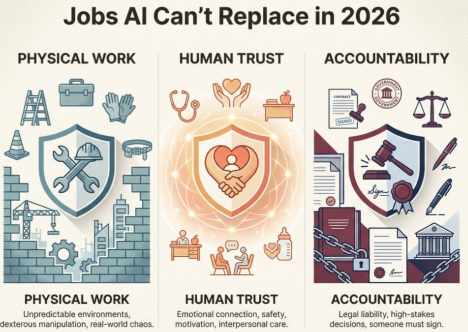
Physical Work in Unpredictable Environments
AI is great in digital space. The real world? It’s a chaotic physics engine.
Robots still struggle with:
- Operating safely around humans
- Dexterous manipulation across ”infinite” object variations
- Perception plus action in dynamic, unstructured environments
Research on robotics explicitly centers the challenge of mobility, dexterity, perception, and safe operation in dynamic and unstructured environments because that’s the hard part.
Research on humanoids in construction lists core blockers like perceptual robustness, adaptive locomotion, human-level dexterity, continual learning, and the fact that construction sites are unstructured and unpredictable.
So: trades, field service, and many on-site roles stay human longer than ”office-only” roles.
Jobs Requiring Human Trust and Emotional Connection
When the ”product” is a human feeling safe, understood, motivated, or supported, replacing the human with a machine often breaks the product.
Think therapy, nursing, teaching, coaching, social work, complex customer situations.
Healthcare research notes that AI tools like ChatGPT can’t replace one-on-one human interaction or the interpersonal skills that health care professionals possess. Doctors and nurses provide bedside care, comfort, and ethical judgment that keep people as ”an essential part of health care.”
Roles Where Someone Must Be Legally Accountable
Even if AI can draft, predict, and recommended, someone still has to be the accountable singer when stakes are high (health, safety, law, money, governance).
Society doesn’t just ask ”can the machine do it? It asks ”who’s liable when it goes wrong?”
Pros & Cons of AI Replacing Work
Pros
- Efficiency
- Speed
- Cost
Cons
- Job Displacement Fear
- Over-dependence
- Skill Gap
The Future of Work: Adapt or Lag Behind
Look, here’s the deal: companies that want to survive aren’t just buying AI tools-they’re rebuilding their entire workforce from the ground up. You must focus on creating learning programs that don’t feel like boring corporate training, but more like real-world skill bootcamps. We’re talking about marketing teams learning to use AI as a brainstorming buddy, customer service reps turning chatbots into their secret productivity weapon, and managers who see technology as a teammate, not a threat.
The game-changing organizations are doing something radical: they’re investing in their people’s ability to learn, not just their current skills. They’re giving employees time to experiment, permission to fail, and resources to quickly pick up new capabilities. It’s not about replacing workers-it’s about superchanging them. The companies that get this right won’t just adapt to the AI revolution. They’ll lead it.
Conclusion
By 2026, AI tools like Claude, Zapier, and agentic workflows are capable of automating up to 80% of repetitive, information-heavy tasks, shifting human focus to strategy and nuance. Success requires developing hybrid skills and adopting AI to handle administrative tasks, with professionals who leverage these tools replacing those who or not.
FAQ Section
Which jobs will AI replace first in India?
Data entry clerks, telemarketers, and basic customer support roles face the earliest displacement. These positions involve highly repetitive, pattern-based tasks that AI handles efficiently. Many Indian companies have already automated 50% or more of these functions.
Are government jobs in India safe from AI?
Government administrative roles face the same automation pressures as private sector equivalents. However, job security provisions and slower technology adoption mean displacement will happen more gradually. Frontline service roles requiring citizen interaction remain more secure.
How can I check if my job is at risk from AI?
Analyse your daily tasks honestly. If more than 70% involves repetitive processing, following fixed rules, or handling standardised data, your role faces higher risk. Roles requiring judgement, creativity, or relationship-building in unpredictable situations are safer.
What new jobs will AI create by 2030?
Emerging roles include AI trainers, prompt engineers, AI ethics specialists, human-AI collaboration managers, and AI maintenance technicians. NASSCOM estimates that India could see 2 to 3 million new AI-related jobs by 2030, though exact numbers remain uncertain.