To run Google Ads, create an account at ads.google.com, set a goal (sales/leads), and define your audience and budget. Create compelling text ads using targeted keywords and configure conversion tracking to measure success. Start with a search campaign, keep settings simple initially, and avoid broad match to control costs.
This video provides a quick, step-by-step guide to setting up your first Google Ads campaign:
Step-by-Step Guide to Running Google Ads
- Create an Account: visit ads.google.com to sign up. It is recommended to skip the automated campaign creation to maintain control over settings.
- Define Your Goal: Select an objective such as ”Sales,” ”Leads,” or ”Website traffic” to guide the campaign type.
- Choose Campaign Type: Select ”Search” for text ads on Google results, ”Display” for visual ads, or ”video” for YouTube.
- Set Targeting & Budget:
- Location: Target specific countries, cities, or regions.
- Budget: Set a daily budget ($5-$10 is fine for beginners).
- Audience: Select relevant demographics or interests.
5. Set up keywords: choose relevant search terms that users might type to find your product or service.
6. Create Ads: Write compelling headlines (30 characters max) and descriptions (90 characters max) with a clear call-to-action.
7. Set up Conversion Tracking: Ensure you track important actions, like purchases or form files, to know if your ads are effective.
8. Launch: Review all settings and click ”publish” to start your campaign.
What are Google Ads?
Google Ads is the name of Google’s pay-per-click (PPC) platform, which allows businesses to gain visibility across Google’s properties. The most common type of Google Ads ad is the search ad, which appears on the search engine results page (SERP) for search relevant to the advertiser’s products and services-but businesses also use Google Ads to run display ads, shopping ads, YouTube ads, and more.
Here is the Google Ads dashboard, you can idea from this. how to implement on this:
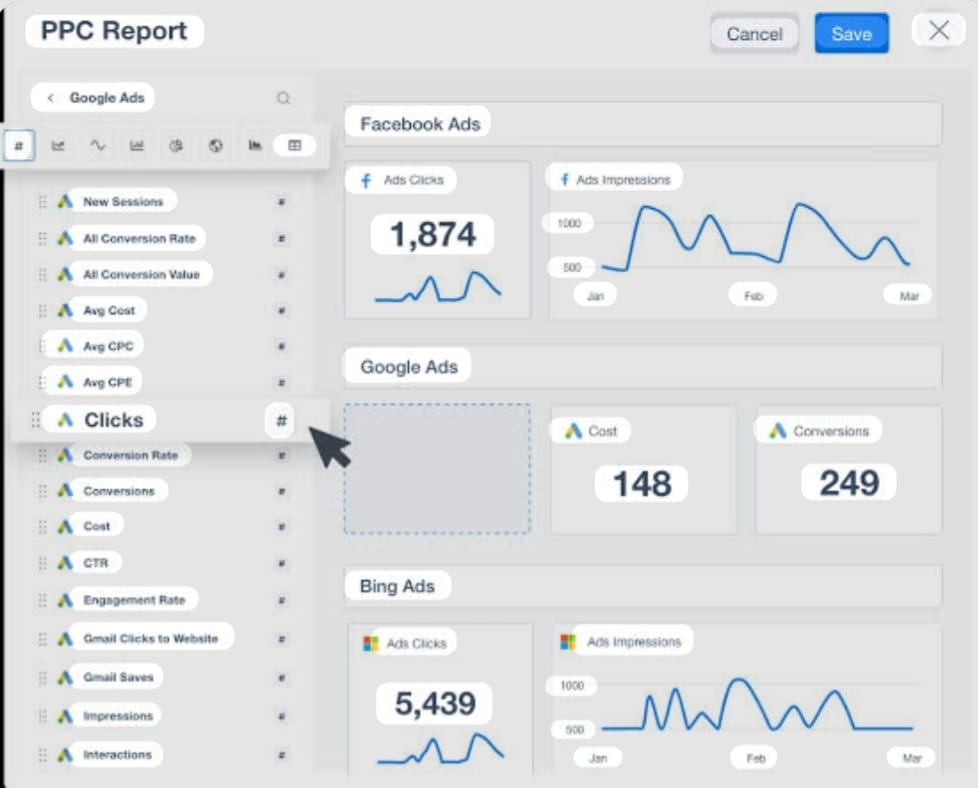
A Google Ads dashboard is a customizable, visual analytics tool within the Google Ads interface that consolidates campaign performance data-such as impressions, clicks, conversions, and ROI- into one view. It enables, real-time monitoring, trend analysis, and data-driven optimization for search, display, and video campaigns.
Key Features & Functions
- Customization: Users can build bespoke reports using cards, including scoreboards for high-level metrics, charts for trends, and tables for detailed data.
- Performance Tracking: key metrics include Click-Through Rate (CTR), Cost-Per-Click (CTC), Conversion Rate, and total spend.
- Real-time Monitoring: Data is updated in real-time, allowing for immediate action on campaigns that are underperforming.
- Collaboration & Sharing: Dashboards can be shared with team members or exported as PDF reports.
Benefits
- Efficiency: Reduces information overload by centralizing data.
- Insights: Identifies top-performing ads and creatives, allowing for better budget allocation.
- Strategy Optimization: Enables tracking of ROI and conversion rates to improve overall marketing strategy.
for more advanced, automated reporting, many advertisers integrate Google Ads data into third-party tools like AgencyAnalytics or DashThis.
Types of Google Ads
Here are five types of Google ads:
1. Google Search Ads
Google search ads show up on Google’s search engine results pages (SERPs) when users search for certain keywords. Here is an example of a search ad for ”buy” firm mattress online.”
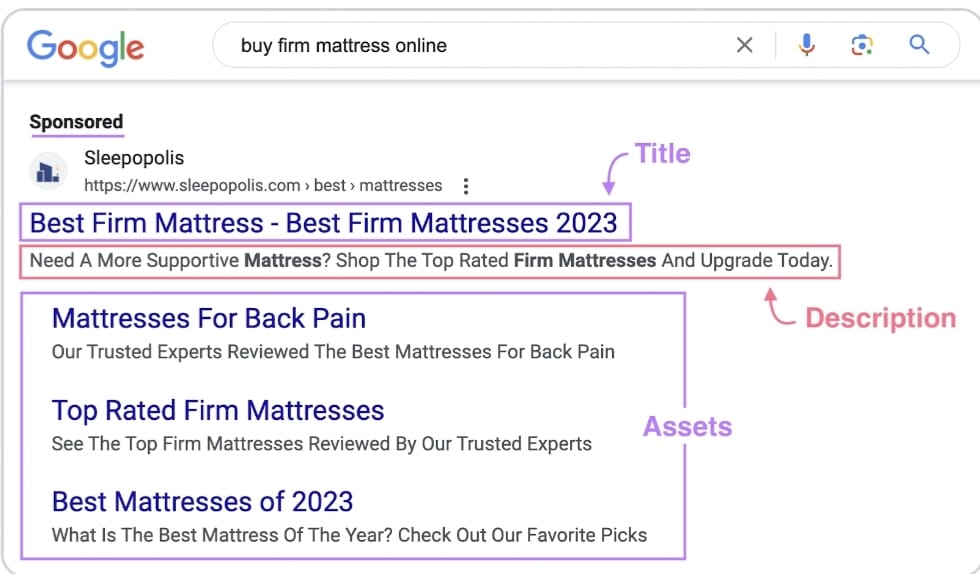
This ad contains three main parts:
- Title & description: The headline and text summarizing the product or service.
- Ad Assets: Additional details such as page links, selected during setup.
These ads typically appear at the top or bottom of the SERP.
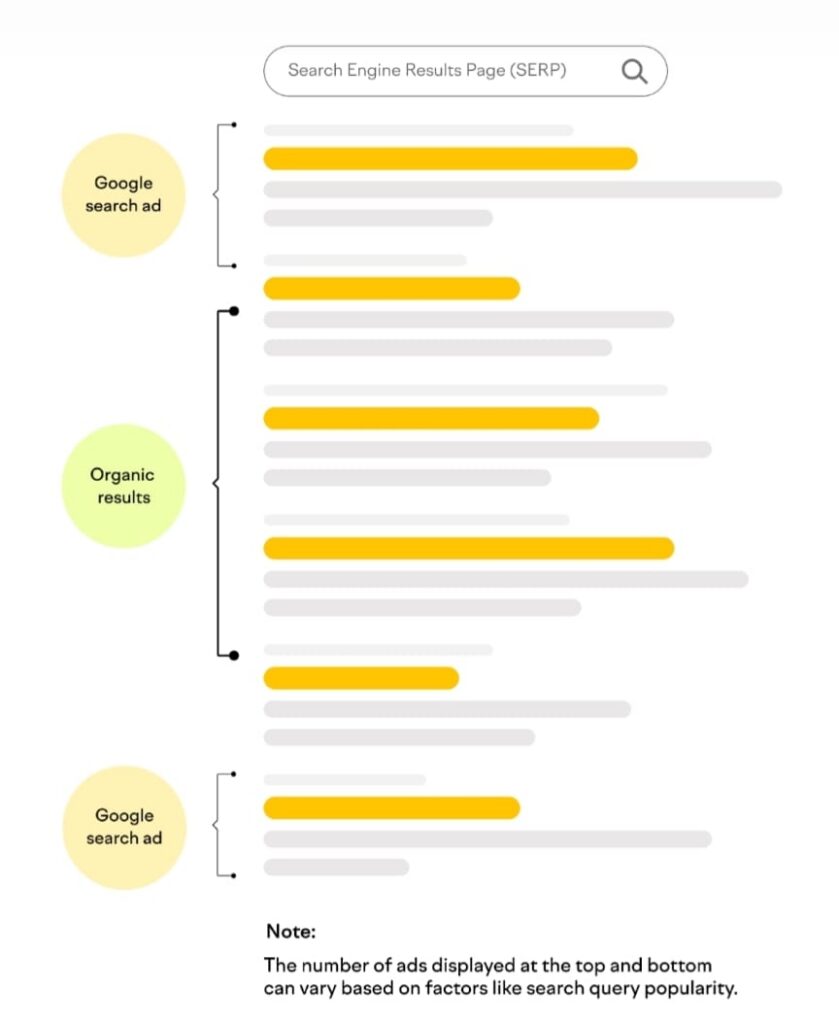
Search ads match user intent. Ads can help you connect with potential customers at the moment they’re searching for products or services related to your business. For instance, if someone searches ”best running shoes,” a shoe store can place its ad at the top of the results page.
For a quick and easy setup, use Ads launch assistant. It’s part of semrush Advertising Toolkit and lets you manage Google Ads and Meta campaigns from start to finish with AI and semrush data.
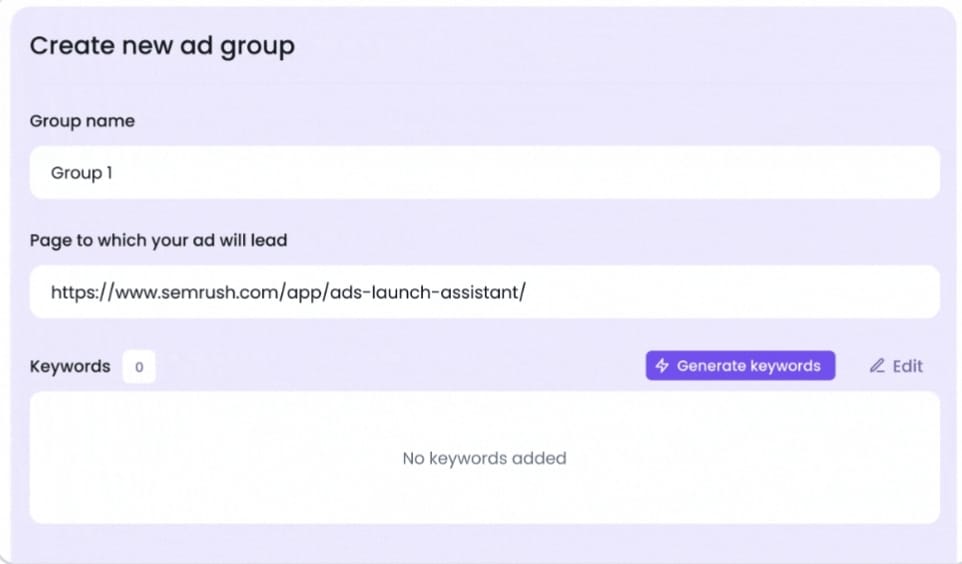
Simply enter your URL, language, and target location to get keyword suggestions and AI- generated ad copy. Then confirm your campaign settings, set a budget, and launch your ads; all in one place.
2. Google Display Ads
Google Display Network (GDN) ads are visual ads placed on websites, apps, and platforms that partner with Google through AdSense. Here’s an example of a display ad on the Washington post website:
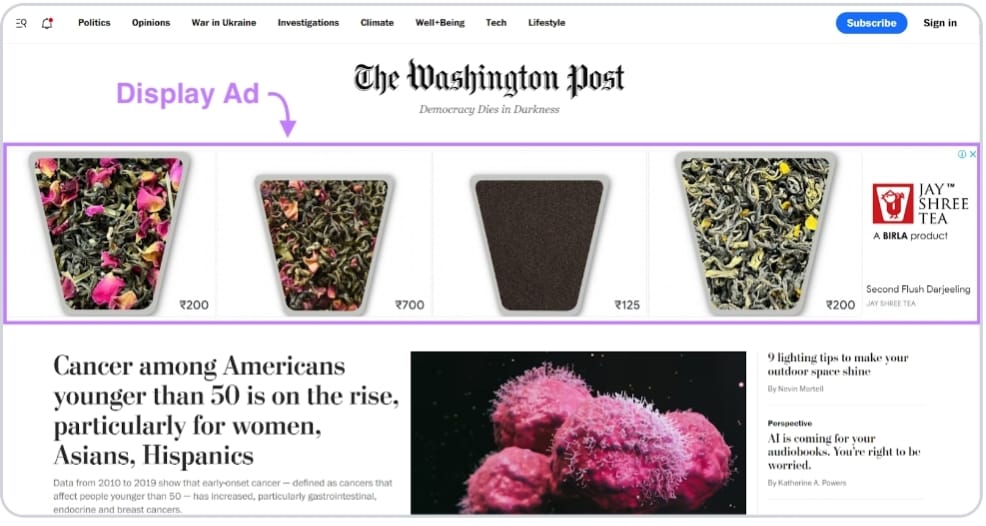
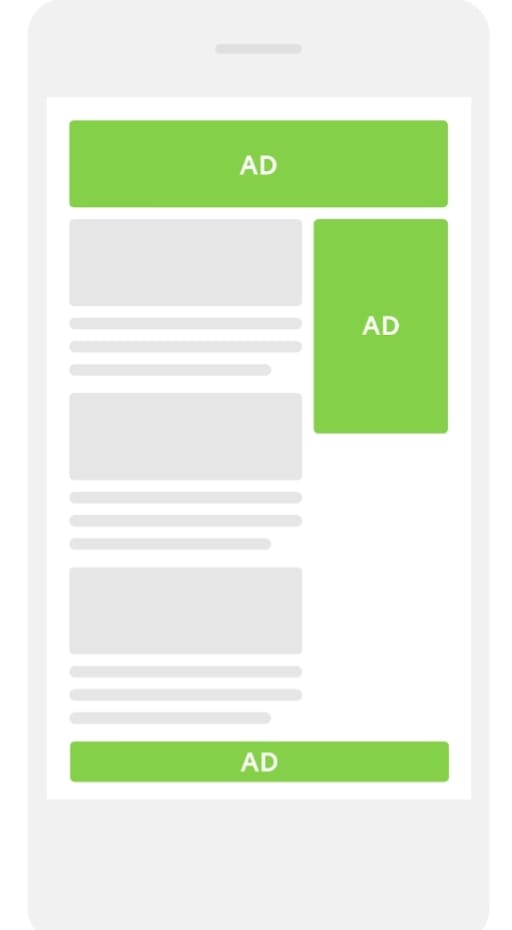
These ads can appear in the banner, sidebar, or footer. Display ads are shown to users based on their interests and browsing behaviour, rather than specific search queries. if you often read fitness articles, you may see ads for running shoes on a news website.

3. Google Shopping Ads
Google Shopping ads present products directly in search results, complete with images, prices, and store names. These ads appear when users search for specific products. Here’s an example:
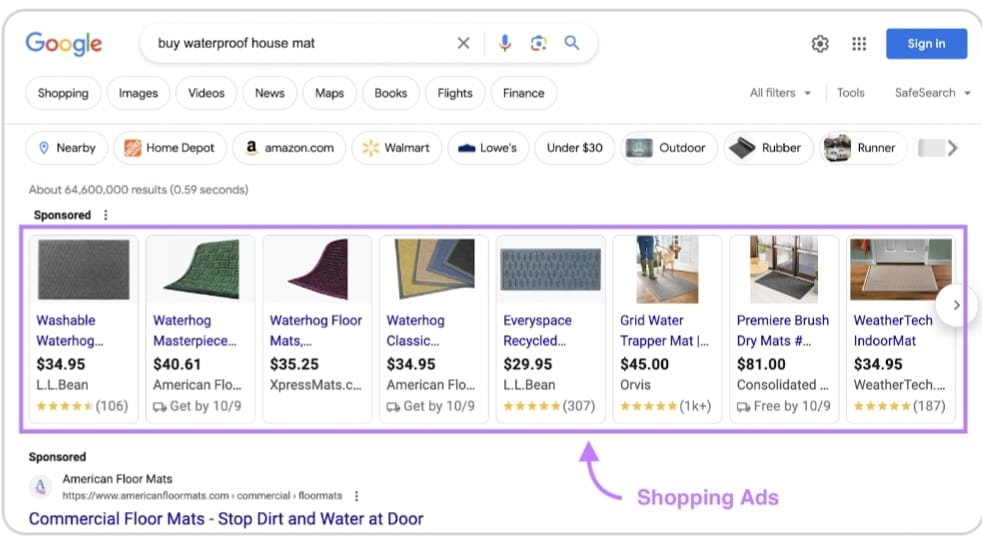
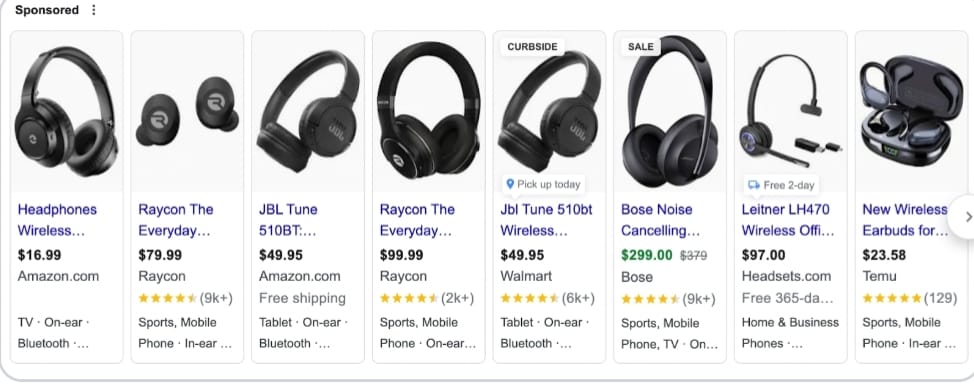
The main advantage is the detailed product display, for example, users who search for ”wireless headphones” see a list of products with images and prices. A shopping ad allows them to compare and choose without leaving the search results page.
Google Video Ads
Google video ads appear on YouTube. Video ads can play before (pre-roll), during (mid-roll), or after (post-roll) a user’s video. Here’s an example of a video ad:

YouTube is one of the largest search engines, so you can reach a wide audience with video ads. video ads use visuals and sound to convey your messages. you can display your online advertisements based on viewer interests, demographics, or the content users are watching. For instance, a travel agency might target viewers watching travel vlogs or destination reviews.
Google App Ads
Google App ads help you promote your mobile application. you provide text and images, and Google automatically creates multiple ad formats. These ads appear across Google search, Google play store, YouTube, and the Display Network. Here’s an example of a Google App ad on YouTube:
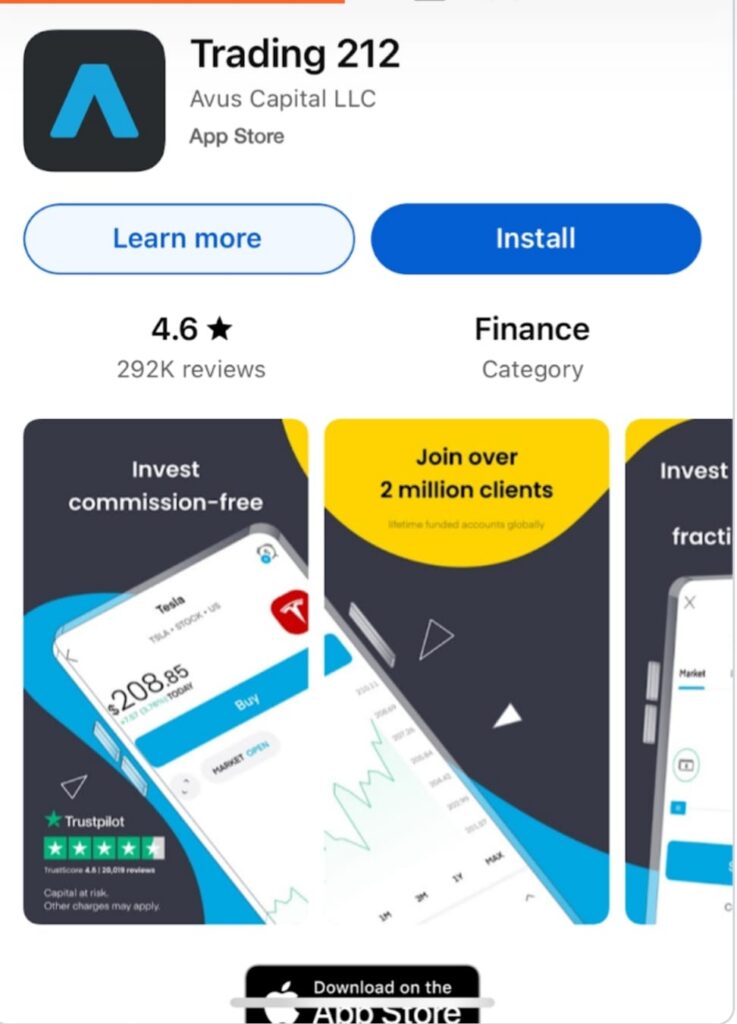
App campaigns can focus on:
- App installs: Increase downloads
- App engagement: Encourage users to return
- App pre-registration: Let Android users sign up to get notifications when your new app launches.
How does it works google ads
Google Ads operates as an online advertising program where businesses play to display brief advertisements, service offerings, or videos to web users, primarily based on keywords they search for. Utilizing an auction system, Google Ads determines ad placement based on bid amount and ad quality, charging advertisers mainly when users click (Cost-per-click).
Key Components of How Google Ads Works:
- Targeting Mechanisms: Advertisers select keywords-words or phrases relevant to their products or services-which trigger their ads to appear when users search for those terms on Google.
- The Auction System: Every time a search occurs, Google runs a ”lighting-fast” auction to determine which ads to show and in what order.
- Ad Rank Factors: An ad’s position is not solely determined by the highest bid. It is determined by Ad Rank, which combines your bid amount with the Quality Score (relevance of your ad, keywords, and landing page).
- Bidding Strategies:
- Cost-per-click (CPC): You pay when someone clicks your ad.
- Cost-per-mille (CPM): You pay per 1,000 impressions.
- Cost-per-engagement (CPE): You pay for specific interactions.
- Cost-per-acquisition (CPA): You pay when a user converts.
- Campaign Types:
- Search Network: Text ads on Google search results.
- Display Network: Banner ads on websites and apps.
- Video: Ads on YouTube.
- Shopping: Product listings on Google Shopping.
- Budget Control: you set your own budget, with no minimum spending commitment, allowing you to control costs.
Conclusion
Google Ads is an indispensable, high-ROI digital marketing tool that provides immediate visibility, precise audience targeting, and measurable results. By leveraging intent-based search data and advanced AI, it enables businesses to connect with active buyers, making it a critical, strategic investment for growth in a competitive online landscape.
FAQ Section
what is Google Ads?
Google Ads is an online advertising platform where businesses pay to show their ads on Google search results and other websites.
How does Google Ads work?
Google Ads works on a pay-per-click (PPC) model, where advertisers pay when someone clicks on their ad.
Is Google Ads for small businesses?
Yes, Google Ads is useful for small businesses because it helps reach potential customers quickly.
How much does Google Ads cost?
The cost of Google Ads depends on the competition of keywords and the budget set by the advertiser.
What is CPC in Google Ads?
CPC (Cost per Click) is the amount an advertiser pays when someone clicks on their ad.
What are keywords in Google Ads?
Keywords are the words or phrases that trigger ads to appear when users search on Google.
Is Google Ads better than SEO?
Google Ads gives instant traffic, while SEO takes time but provides long-term results.
How can I create a Google Ads account?
You can create an account by visiting the Google Ads website and signing in with your Google Account.
What is Quality score in Google Ads?
Quality Score is a rating given by Google based on ad relevance, keywords, and landing page quality.
Can I run ads with a low budget?
Yes, you can run ads with a small daily budget and control how much you spend.